

Office suite
Write, calculate, present. Your documents stay yours.
Scriniux brings documents, spreadsheets, presentations, PDFs and drawings together in a single app, with a scanner for paper. Your documents live where you decide: no third-party cloud, no in-app tracking, no account to set up.
- No third-party cloud
- No in-app tracking
- Works offline
For Android, free and with no ads. For iPhone, Windows, Mac, Linux and the web, there is a waiting list.
Features
Five tools in a space that stays yours
Letters, tables, presentations, PDFs, drawings and scanned documents open in the same app and only go where you decide. Just one app to install and keep up to date.
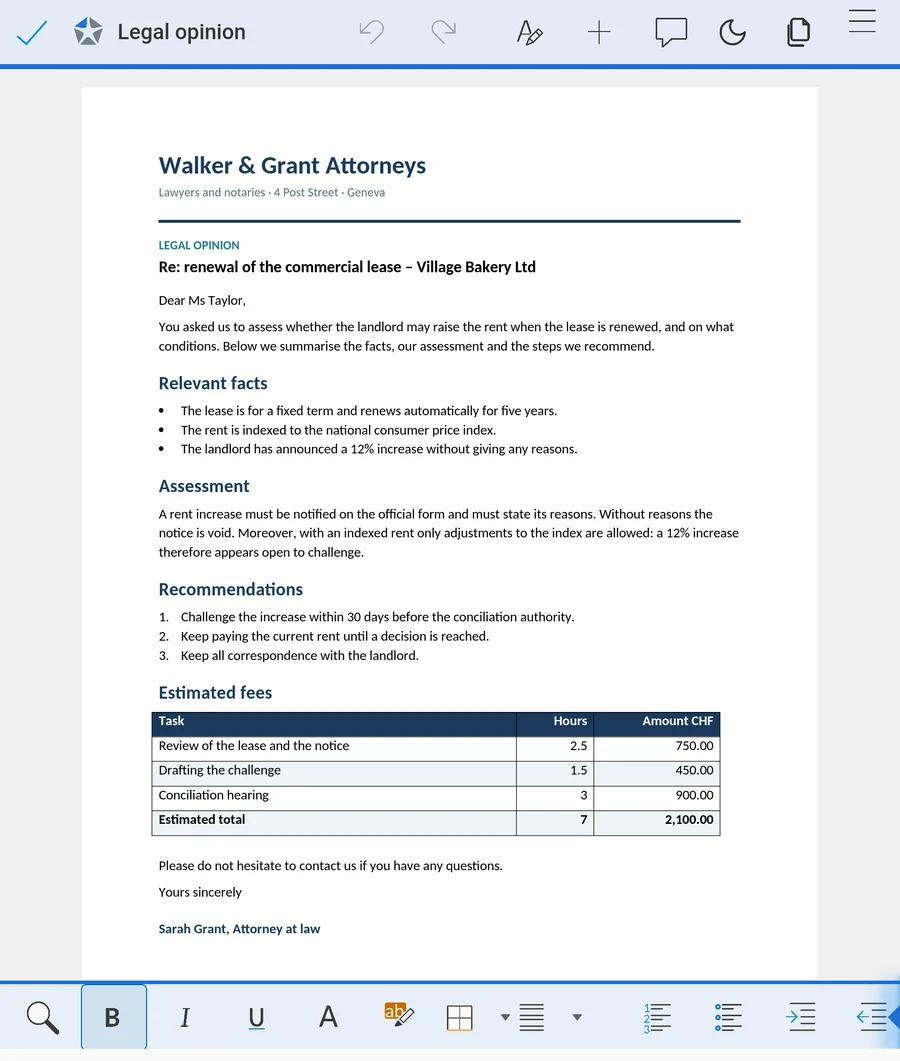
Letters, contracts, opinions, reports. Write and edit with headings, tables and images.
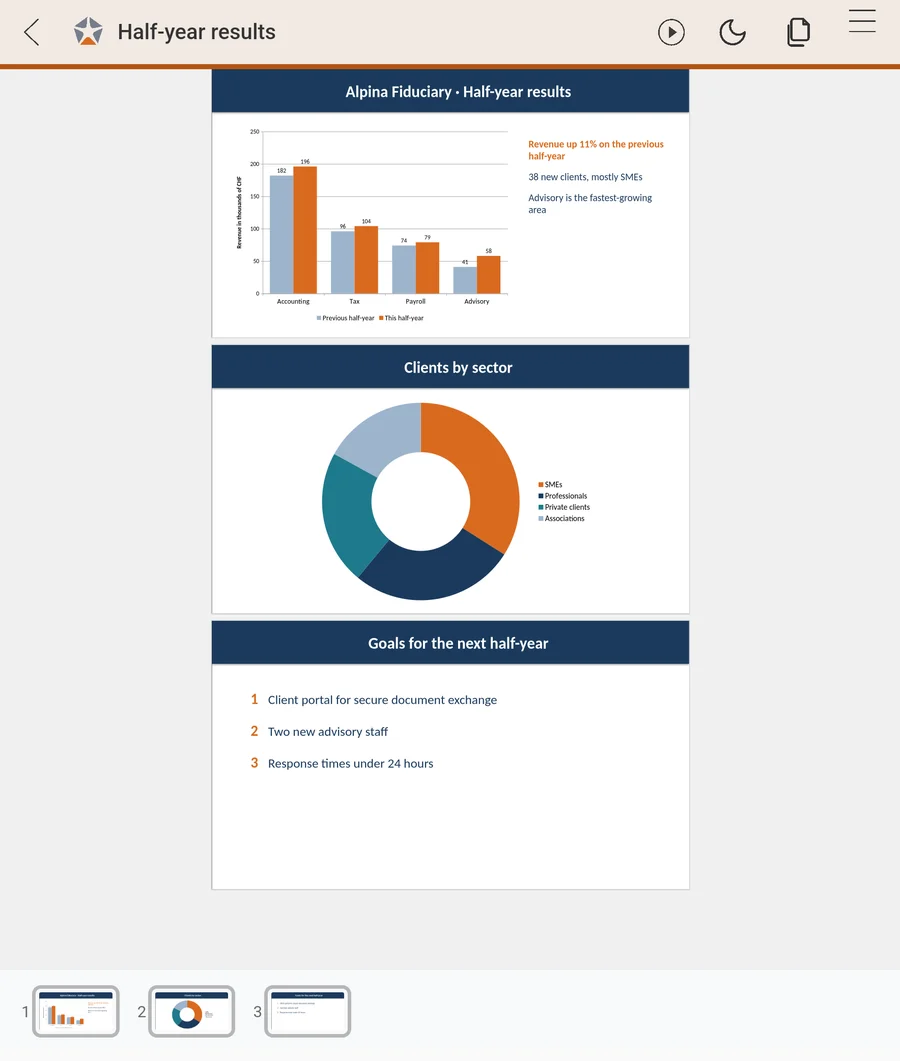
Calculations, lists, quotes and deadline trackers, with formulas and multiple sheets in one file.
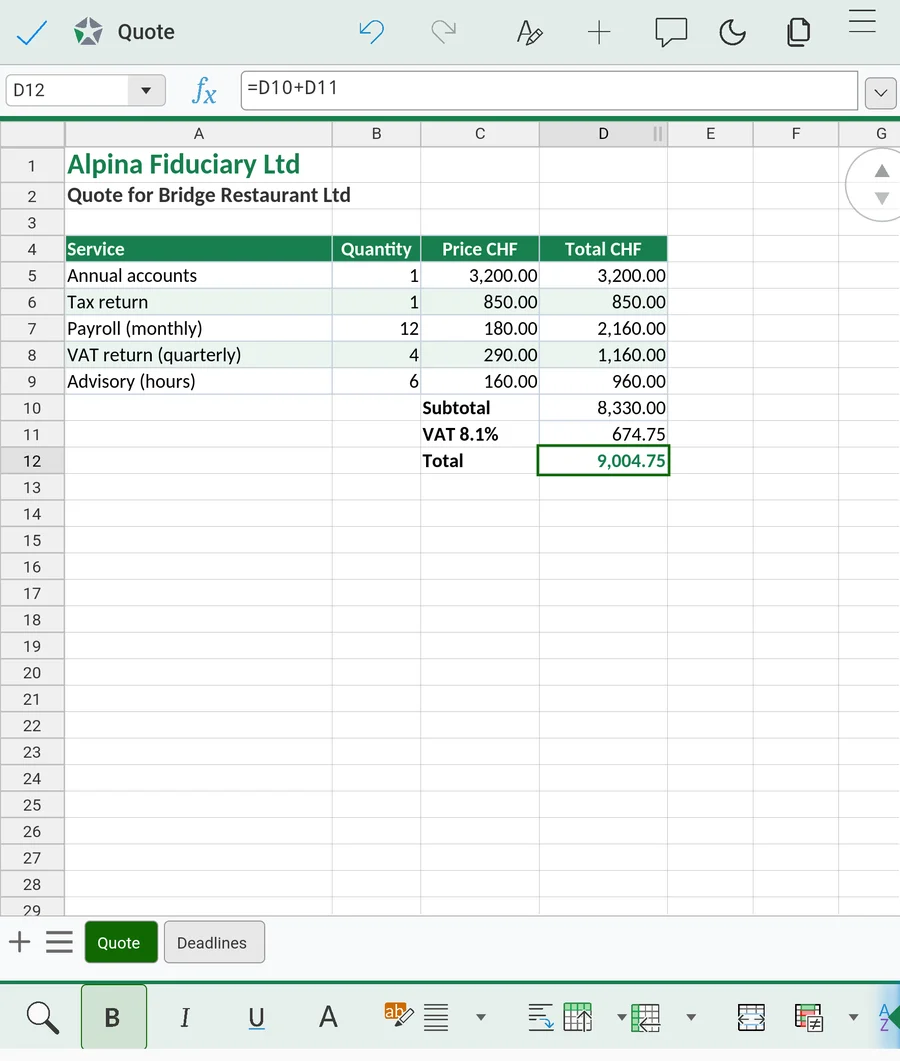
Prepare slides for a client, a meeting or a lesson and present them from your device.
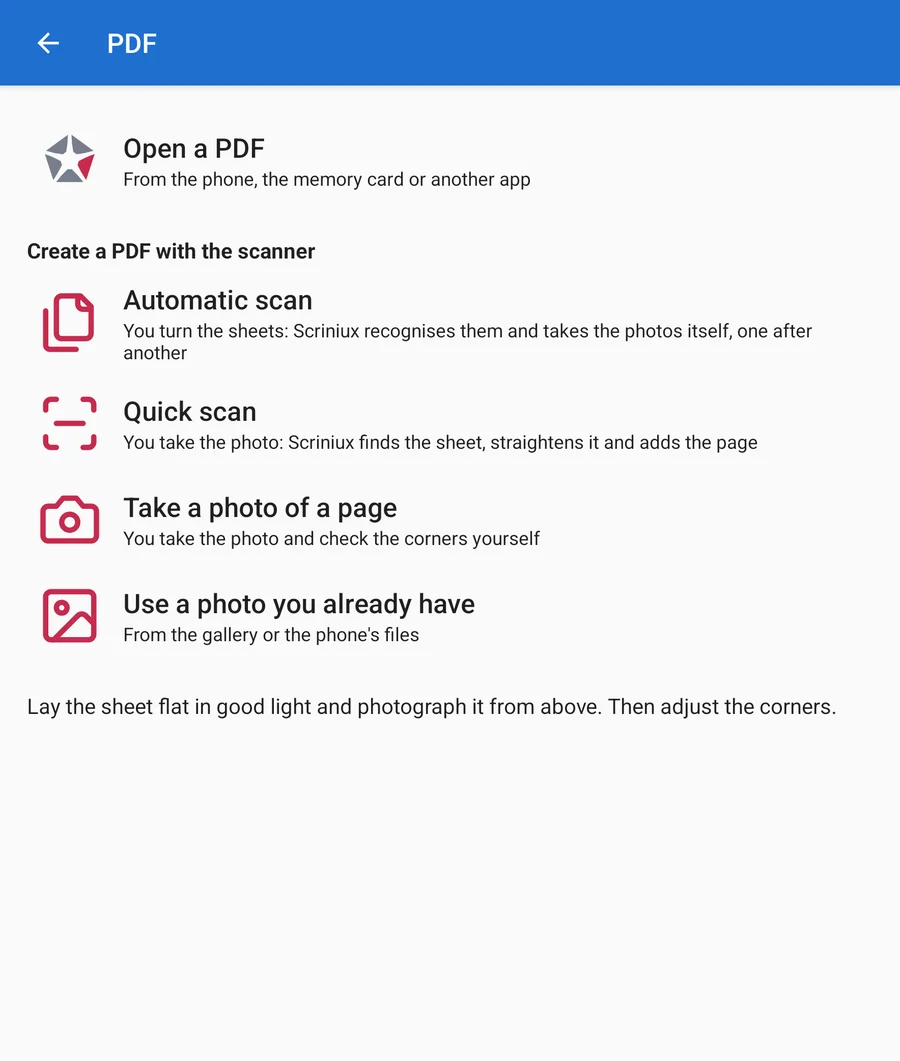
Read the PDFs you receive and create new ones with the scanner: hold the phone over each page, Scriniux detects the edges, takes the photo automatically and makes the text searchable.
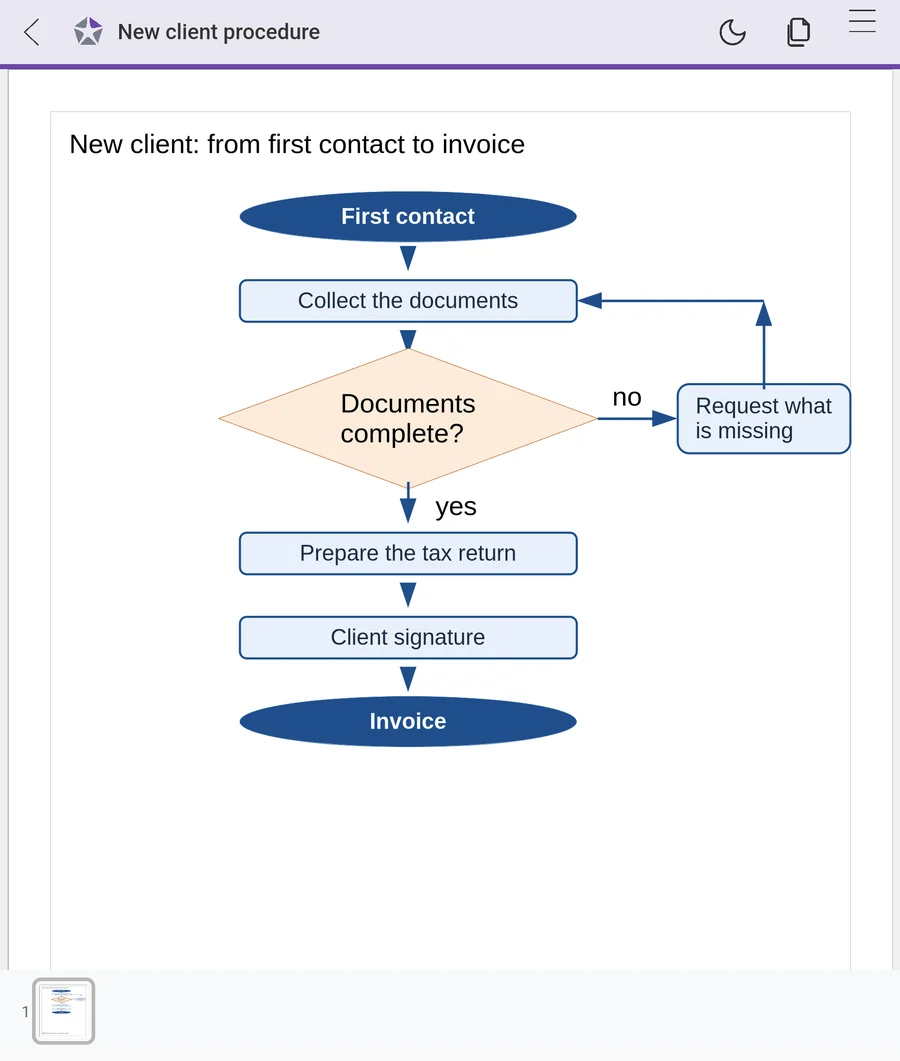
Sketches, diagrams and drawings: shapes, arrows, flowcharts, text and images, across several pages. Export them as PDF or PNG.
Word processing .docx · .odt · .md
Drawings .odg
PDF .pdf
Presentations .pptx · .odp
Spreadsheets .xlsx · .ods
The office suite, in a single app.
Data sovereignty
Your documents stay where you decide
A contract, a medical record, a set of accounts: for the people who look after them, confidentiality is not optional. With cloud suites, documents sit on other people's servers and pass through their services. Scriniux is built so that your documents stay yours, and there are some things you can check for yourself.
-
Works without a connection
Documents, spreadsheets, presentations and drawings can be opened and edited, and PDFs can be read, even where there is no network: on a train, on a plane, in an archive.
-
No in-app tracking
The app contains no analytics, advertising or profiling tools. What you write does not become data about you.
-
You decide who reads your documents
No artificial intelligence reads or analyses your documents. If one day you want to use it, you will choose which one and on which documents.
-
Only the services you choose
It connects only to the services you choose, your FileFort for documents and your Akomodix mail for attachments, never to third parties. It keeps working without a connection.
-
On your device or in Switzerland
Your documents live on your device or in your FileFort, the storage service that keeps its data on servers in Switzerland. No third-party cloud.
-
No account to set up
You do not need to create an account to use Scriniux, and your documents do not pass through services you do not control.
-
Camera only with your consent
The camera is used only for the scanner, after you give your consent, and the scan photos do not end up in your phone's gallery.
-
Only the files you choose
It does not ask for access to all the files on your phone. You open and save documents with the system file picker, one at a time.
You can check this yourself: your phone lists the permissions of every app in its settings, under the app's name.
-
Word processing
Letters, contracts, opinions, reports. Write and edit with headings, tables and images.
Formats: .docx · .odt · .md
-
Spreadsheets
Calculations, lists, quotes and deadline trackers, with formulas and multiple sheets in one file.
Formats: .xlsx · .ods
-
Presentations
Prepare slides for a client, a meeting or a lesson and present them from your device.
Formats: .pptx · .odp
-
PDF
Read the PDFs you receive and create new ones with the scanner: hold the phone over each page, Scriniux detects the edges, takes the photo automatically and makes the text searchable.
Formats: .pdf
-
Drawings
Sketches, diagrams and drawings: shapes, arrows, flowcharts, text and images, across several pages. Export them as PDF or PNG.
Formats: .odg
Opens and saves the files you receive every day
- .docx
- .odt
- .md
- .xlsx
- .ods
- .pptx
- .odp
- .odg
Platforms
The same app, on every device
On the web, on your phone, on your tablet and on your computer: the same interface, the same commands, the same files. Learn it once and work anywhere.
-
Web
In the browser, with nothing to install.
-
Android
Phones, tablets and foldables.
-
iOS
iPhone and iPad.
-
Windows
An app for your office computer.
-
macOS
An app for your Mac.
-
Linux
An app for the major distributions.
Integrations
Work with FileFort and Akomodix
FileFort is a storage service that keeps your data in Switzerland; Akomodix is an email and web presence service. They are separate products: use them with Scriniux if you need them, and Scriniux also works without them.
-

FileFort
Open and save documents in your FileFort, the storage service that keeps your data in Switzerland.
filefort.swiss -

Akomodix
Open and edit attachments from your Akomodix email and save them to FileFort.
akomodix.swiss
Phone and foldable
Designed for foldables
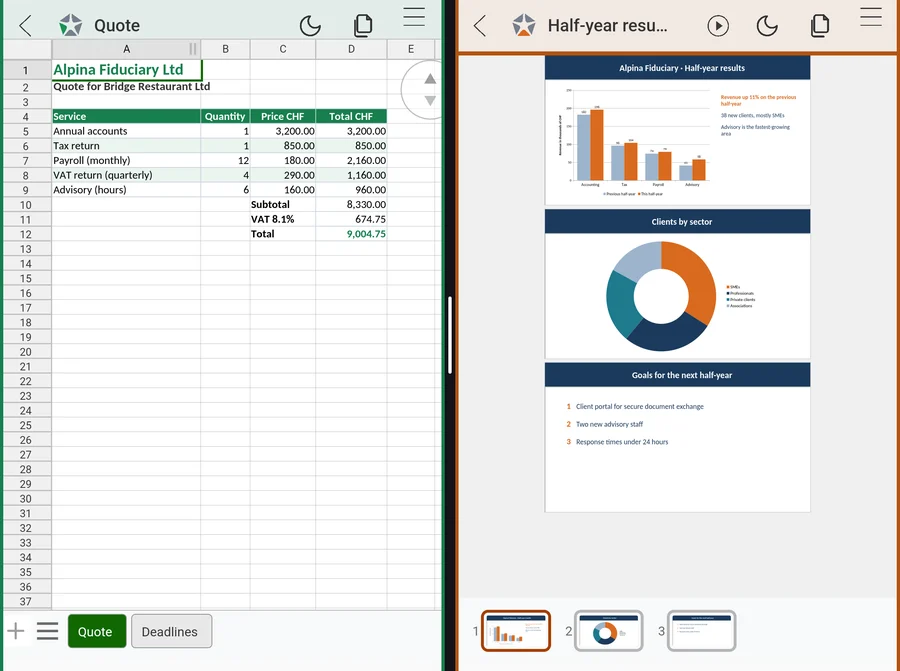
Scriniux works on phones and foldables. Open or close your foldable mid-task without losing your work.
- Foldable open or closed, without losing your work
- Phone, tablet, foldable and computer
Who it's for
For anyone whose documents matter
Professional firms and businesses, but also teachers, students and families: Scriniux is designed for people who write, keep and share documents and want to know where they end up.
-
Law firms
Case files and opinions covered by professional secrecy, without going through a third-party cloud.
-
Notaries
Draft deeds and documents to review with clients.
-
Accounting and fiduciary firms
Clients' accounts and .xlsx spreadsheets in their own formats; photograph paper receipts and supporting documents with the scanner.
-
Medical practices
Medical reports and certificates; photograph the paper ones with the scanner and they become PDFs.
-
SMEs
Quotes, invoices, deadline schedules and minutes, in the office and on the move.
-
Teachers
Lessons, tests and presentations to project in class, prepared even without a connection.
-
Students
Essays, reports and presentations, even in the library or on a train without a connection.
-
Families
Bills, contracts and the children's homework; photograph household papers with the scanner.
The name
From scrinium, the safekeeping of records
In imperial Rome the scrinia were the chancery offices that drew up and kept official records; the scrinium was the cylindrical case in which scrolls were stored. Scriniux draws on that root: a place where documents are written and kept safe.
Pronunciation: SKRI-niuks
Questions and answers
The answers, in brief
Where do my documents end up?
Where you decide: on your device or in your FileFort, on servers in Switzerland. Scriniux does not upload them to any third-party cloud.
Where can I download it and how much does it cost?
You install the Android app from Google Play. It is free, with no ads and no in-app purchases.
Do I need an account to use Scriniux?
No. Your documents live on your device or in your FileFort in Switzerland, and do not pass through services you do not control.
Does Scriniux work without an internet connection?
Yes. Documents, spreadsheets, presentations and drawings can be opened and edited without a connection, and PDFs can be read. When you are online, Scriniux connects only to the services you choose, your FileFort for documents and your Akomodix mail for attachments, never to third parties.
Does Scriniux collect data about me?
No. The app contains no analytics, advertising or profiling tools.
Which formats does it open?
Microsoft Office formats (.docx, .xlsx, .pptx), OpenDocument formats (.odt, .ods, .odp and, for drawings, .odg), PDFs and Markdown files (.md).
Does Scriniux open Markdown files (.md)?
Yes. A .md file opens formatted, with headings, lists, tables, links, quotes and code blocks, and you edit it like a text document. A button takes you to the Markdown text exactly as it is: there you can edit and save it without anything else changing. If you save from the formatted view, the content stays the same but the Markdown is rewritten in a slightly different form. All on your phone, without a connection.
Will my .docx and .xlsx files open unchanged?
Scriniux opens and saves Office and OpenDocument formats. We have tested headings, lists and tables in documents, and formulas and multiple sheets in spreadsheets. If you use tracked changes, comments, macros or pivot tables, try them with your own files: the Android app is free on Google Play.
Can several of us work on the same file?
At present Scriniux works on your device: a document is edited by one person at a time, and you share files as you do now, in Office and OpenDocument formats.
Do I have to use FileFort or Akomodix?
No. Scriniux works on its own, with the files on your device. FileFort (storage with your data in Switzerland) and Akomodix (email and web presence) are separate products: use them if you need them.
Which devices does it work on?
On the web and as an app for Android, iOS, Windows, macOS and Linux, with the same interface and the same commands everywhere.
Does the scanner recognise text?
Yes. Take a photo of a paper document and Scriniux turns it into a PDF with searchable text, or extracts the text into an editable document (.docx). Recognition happens on your phone, without a connection, and takes a few seconds per page. Printed text comes out well; tables and tick boxes are less accurate, and handwriting is not recognised.
How does automatic scanning work?
Frame the sheets from above: when a sheet is still and fully in view, Scriniux detects its edges and takes the photo by itself, then waits for the next sheet. It works best in good light, with a light-coloured sheet on a darker surface, and it is designed for single flat sheets, not bound books. If it does not take the photo, you can always take it yourself.
If I lose my phone, what happens to my documents?
Your documents are in the folder you choose when you save them: Scriniux has no storage of its own and does not copy them to a cloud. It has no PIN of its own: they are protected by your phone's screen lock. Scriniux makes no backups and its data is excluded from the phone's backup. To keep a copy elsewhere, save your files wherever you choose, for example in your FileFort or on a USB stick: Scriniux does not decide for you.
Can I sign PDFs or save them as PDF/A?
No. At present Scriniux lets you read PDFs, but not sign them or save them as PDF/A.
What permissions does it ask for on Android?
It does not ask for access to all your files: documents are opened and saved with the Android file picker, only the ones you choose. The network is used only to connect to your FileFort and to your Akomodix mail, for attachments. The camera is used only for the scanner, after you give your consent, and the scan photos do not end up in your phone's gallery.
Does it work on foldable phones?
Yes: you can open or close the phone while you work without losing the document.
What is the waiting list?
It is a list of people who want to hear when the versions for iPhone, Windows, Mac, Linux and the web arrive, and to receive news about Scriniux. You leave your email address and, if you like, tell us what you would improve in the suite you use today.
Who develops Scriniux?
POWERB SAGL, a Swiss company based in S.Antonino, Ticino.
Waiting list
Join the waiting list
Leave us your email address and tell us which devices you will use Scriniux on: we will write to you when the versions for iPhone, Windows, Mac, Linux and the web arrive and when there is news about Scriniux. The other questions are optional, but they help us build the suite you need.
After signing up you will receive a welcome email; then we will write to you when there is news. Every email includes a link to unsubscribe. The form data stays on POWERB's servers: no third-party form service.